Addin for Excel — GSC Warehouse — Exporter GA4 — Exporter GSC — MCP for GA
Analytics Edge Add-in
No-code automation for Microsoft Excel
Automate both the download and analysis of your search data, web analytics and advertising performance from right inside Microsoft Excel. Simple, wizard-based functions let you avoid fragile formulas or complicated programming, and get you results fast. Build it once, then click to refresh or schedule it for daily, weekly or monthly updates. Send the workbook or PDF by email automatically.
Your data, your spreadsheet, your analysis.
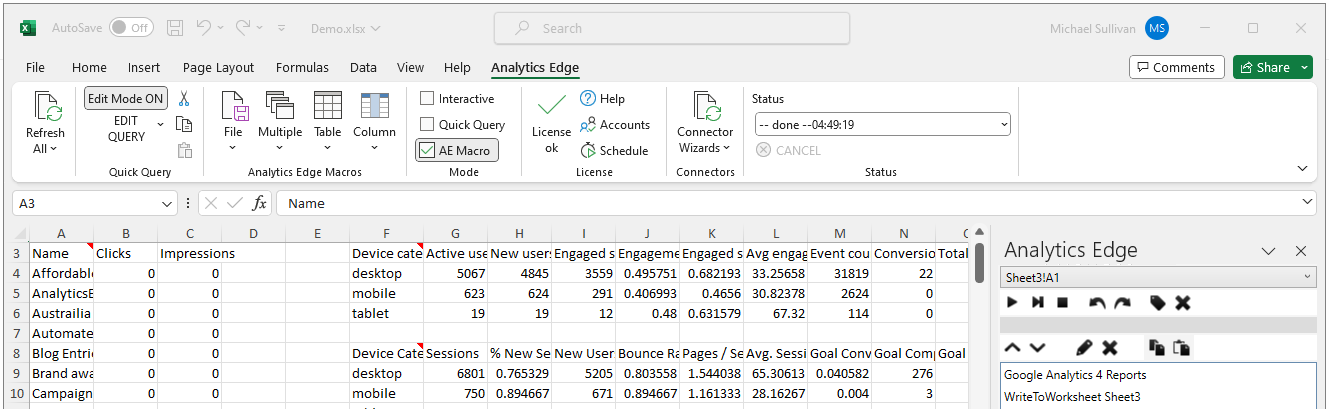
Works with Microsoft Excel 2016+ on Windows PCs
Data Sources
Optional connectors are integrated for many popular ads services:
- Google Analytics
- Google Search
- Bing Webmaster Tools
- Google Ads
- Microsoft Ads
- Facebook Ads
- LinkedIn Ads
- Constant Contact

Quick Queries
Pick a spreadsheet cell, make a query using simple popup wizards, repeat as needed. Functions available to all queries:
- Pivot
- Arrange
- Filter
- Sort / Count
- Write (to worksheet/append to worksheet/write to text file)
Tight Excel Integration
Fully integrated into Excel so you can use cell references and formatting. Place query results where you want them.
- It works inside Microsoft Excel
- Regular Excel workbooks (.xlsx); no macro workbook restrictions
- Everything is wizard-based; no formulas or coding necessary
- Your downloads are fast and written right into your worksheets
- Read parameters from your worksheets to tailor your analysis
Analytics Edge Macros
Open the door to limitless analysis with over 30 wizard-based functions available without ever touching a formula, pivot table or Power Query:
WORKBOOK
- Read worksheet
- Read text/web file
- Read Google Sheet
- Web request
- Write to worksheet
- Write to text file
- Write to Google Sheet
- Append to worksheet
- Save/email PDF
- Save/email workbook
- Send email
- Repeat macro
- Run…if…
MULTIPLE
- Append
- Combine
- Compare
- Lookup
- Match
- Update
TABLE
- AI Request
- Arrange
- Duplicates
- Filter
- Group
- Pivot
- Sort
- Table name
- Top/Bottom
- Total
- Transponse
- Unpivot
COLUMN
- Calculate
- Convert
- Formula
- Join
- Rank
- Replace
- Split
- Subtotal