Get your data faster with half the tokens (experimental, free, no limits). Simple installation: no Python, no Google Cloud projects.
The experimental Analytics Edge MCP Server for Google Analytics is now available, and the initial benchmark is impressive. Here is the back story and the results.
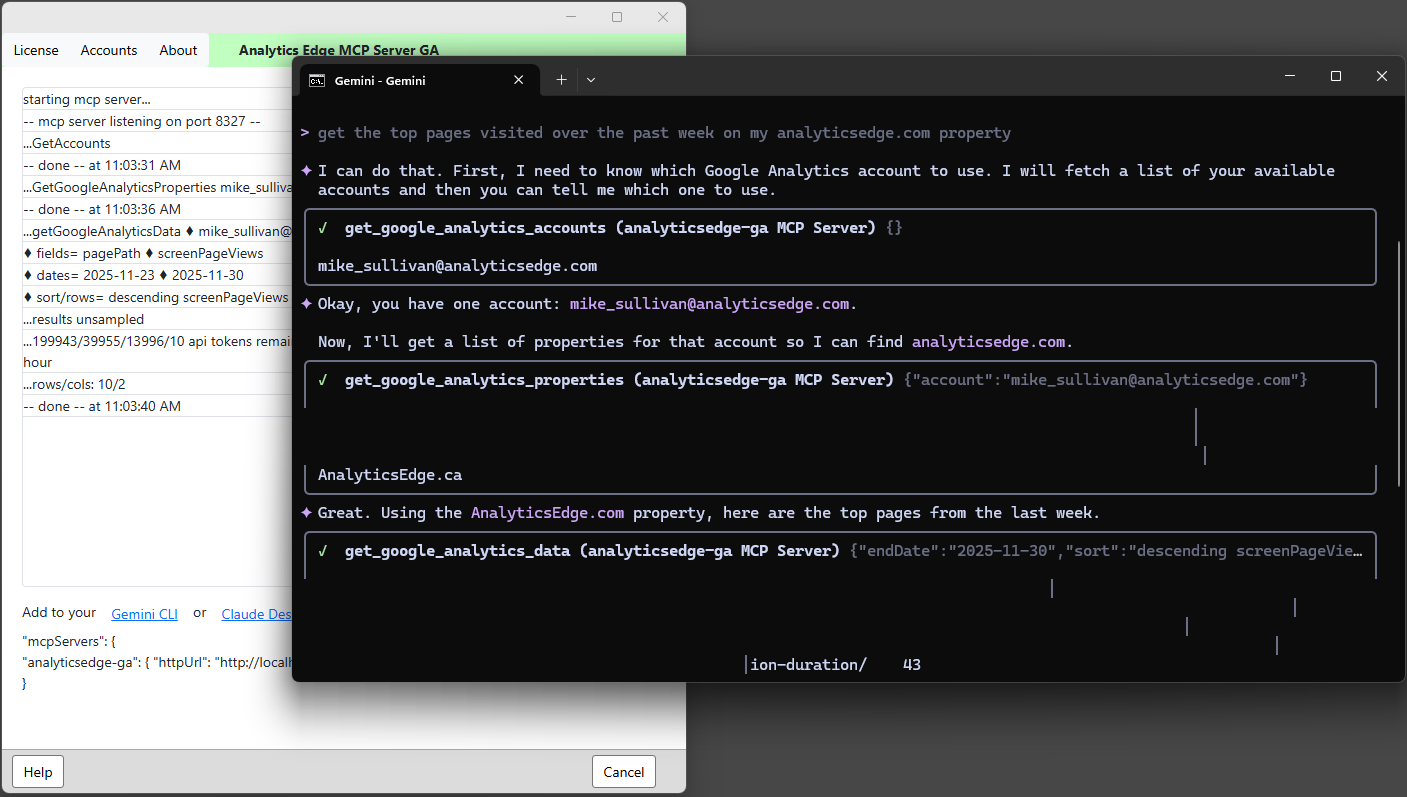
At Analytics Edge, I strongly believe that computers should do the work for you, and you shouldn’t have to work to make the computer do what you want. I see the wide adoption of AI as a step in that direction, but we are in the early days and have a lot to learn.
MCP Servers with API Connectivity
One area I have keen interest in is connecting various data APIs to the AI for analysis and insights. I am disappointed (but not surprised) by the initial solutions being shared, even the ‘official’ ones. They involve:
- very technical installations involving Python and Google Cloud setups
- do little more than expose the raw API methods to the AI with the assumption that the AI will figure it all out
- very hard to validate or debug
That limits the potential users to early adopters, and they will be subject to high operational costs (AI tokens).
There are a lot of things about working with APIs that are skimmed over in the documentation, and the AI may or may not take into consideration. Most MCP server implementations are of the ‘black box’ variety where magic happens and you have to assume the AI got it right. The potential for undetected errors is compounded by the difficulty trying to debug the requests and data flows if/when something goes wrong.
With over 10 years working with the Google Analytics APIs, I thought I’d try to make a better version: easy to install, easy for the AI to work with, and easy to validate.
Built on a Solid Base
Based on the time-tested Analytics Edge connector technology, the MCP server is a desktop application that communicates with an AI desktop client. It shows you what’s happening behind the scenes – what data the AI actually asks for based on your prompts and every interaction with the APIs.
Installation is a simple Windows installer and takes a few seconds [MacOS is possible but not part of the initial experimental phase]. Multiple login accounts are managed by the product using simple browser logins like they are in all Analytics Edge products. No Python, no service accounts, no Google Cloud projects; up and running in minutes.
Helping the AI: use UI field names, not apiNames
A good MCP server makes life easier for both the AI and the end user. Teaching an AI how to use an API is a huge undertaking, and it will consume a large chunk of your AI context space. The AI will also have to sift through this with every prompt you make.
APIs use special field names and have a cross reference (metadata) to the field names used in the web-based application. By making the AI work with the API, you force it to translate field names to build the query and to parse the results. All of that consumes tokens, and while they may be cheap, they are a limited resource.
The Analytics Edge server assumes the AI knows anything about the APIs, so property names and field names are what the user would see in the web interface. The Analytics Edge server does the translation for the API, dramatically reducing the effort (tokens) required to construct a query.
Helping the AI: return tab-separated columns not JSON
When a response comes back from the MCP server, the AI has to parse it and translate it to something the user can understand. With data requests, this is usually a table of data. The problem is that the APIs usually talk JSON with API field names, and often contain extra information beyond what is needed. The AIs are very familiar with handling JSON, but it consumes space and time translating the field names and turning it into a table of data – things that consume more tokens.
The Analytics Edge MCP server pre-parses the JSON responses and returns limited informational text with a tab-delimited data table – the most efficiently AI-parsed data structure – with user-friendly field names, minimizing the tokens required for the AI to ‘understand’ the response.
Helping the AI: handle errors and report corrective action
Mistakes happen, so what happens when things don’t work? If the AI is building the API query, then it also has to handle the API error conditions. Anyone that has worked with APIs knows that error messages are only sometimes helpful, and many are just plain cryptic. We expect the AI to figure out how to handle them all; whether to retry with different parameters or to give up and tell the user about the problem. This is where the poor debugging environment leaves people out in the cold – if the AI can’t figure it out, what are you supposed to do?
The Analytics Edge MCP server error messages have been written specifically to tell the AI what happened and what can be done to fix it. If the problem gets dumped in front of the end user, there is plenty of debugging information available in the form of status logs and debug files.
Note that after 10 years of evolution, the underlying product has acquired built-in rate limiting and auto-retry to minimize errors. It also automatically handles pagination. This is all stuff that the AI doesn’t have to ‘think’ about.
The Results So Far
I ran a quick side-by-side comparison of the ‘official’ experimental Google Analytics MCP server to the experimental Analytics Edge MCP Server for Google Analytics. I entered one prompt to get the AI initialized and aware of the MCP capabilities, followed by a slightly different prompt to see whether subsequent queries were any faster or used fewer tokens.
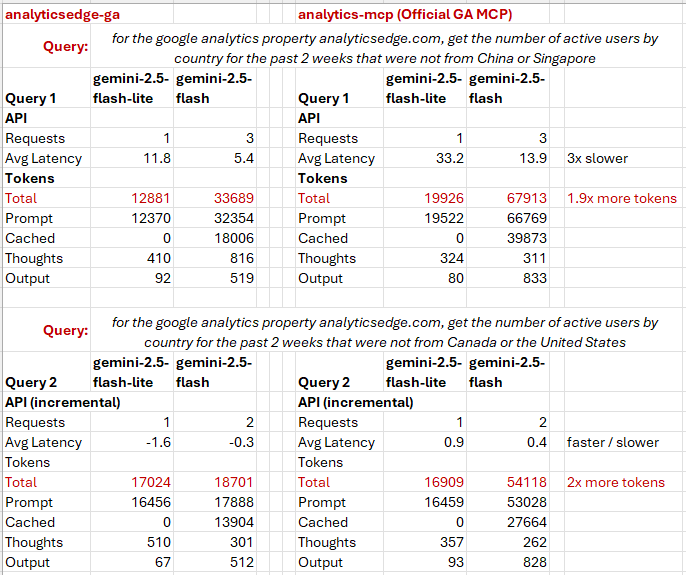
In the first query, even with the same number of requests, the average latency shows that working with the APIs takes 3 times as much time and requires twice as many total tokens.
The second query, the Analytics Edge MCP server gets a little faster, and the official MCP server seems to get a little slower. The difference in total tokens used stays around 2:1.
What is interesting to see is that the more powerful AI model (gemini-2.5-flash) usage drops significantly for the Analytics Edge MCP server (33,689 -> 18,701), while the official MCP server usage starts higher and drops less (67,913 -> 54,118). This validates the benefits of the approach.
Let the experiments continue…